

Most travel websites I audit have the same technical problems. Bloated page templates, broken hreflang implementations, missing schema markup, and crawl budgets wasted on faceted navigation that nobody asked Google to index. These issues cost real money in lost visibility and bookings.
After numerous technical audits, I have compiled all the findings into this 12-point checklist. Each item connects directly to revenue impact, not abstract SEO theory.
1. Core Web Vitals and Real User Performance
Travel websites are image-heavy by nature. Destination pages, hotel galleries, tour showcases, everything demands high-resolution visuals. This creates a constant tension between visual appeal and page speed.
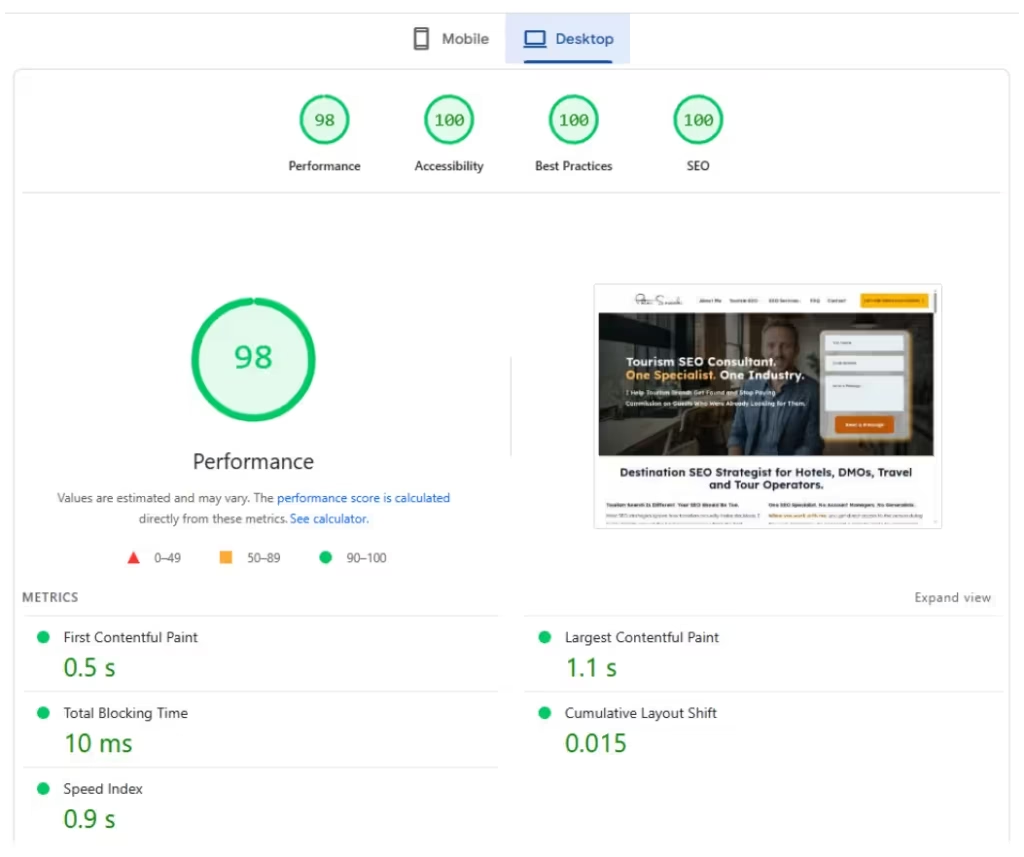
Check Largest Contentful Paint (LCP) in Google Search Console under Core Web Vitals. If more than 25% of URLs fail the threshold (over 2.5 seconds), you have a problem that affects rankings and user experience simultaneously.
What I look for specifically:
- Hero images above the fold without proper sizing attributes
- Missing lazy loading on below-fold gallery images
- Unoptimized WebP or AVIF format adoption
- Third-party booking widgets loading synchronously instead of deferred
When I audited an adventure tourism site last year, their hero video was loading a 12MB file on mobile. Switching to a static image with a play button overlay (loading video only on interaction) dropped LCP from 4.8 seconds to 1.9 seconds. Organic traffic to that page increased 34% within two months.
2. Mobile Usability Beyond the Basics
Google uses mobile-first indexing, which means the mobile version of your travel site is the primary version for ranking purposes. Yet I still encounter booking forms with tap targets so small they require surgical precision to use.
Run your key landing pages through Chrome DevTools device emulation. Test on actual devices if possible. What matters:
- Tap targets minimum 48×48 pixels with adequate spacing
- Forms that do not require horizontal scrolling
- Sticky booking CTAs that do not cover critical content
- Map embeds that function properly on touch screens
The mobile usability report in Search Console catches obvious issues, but it misses subtle problems like date pickers that break on iOS or dropdown menus that overlap with sticky headers.
3. Crawl Budget Allocation
Travel websites generate URL bloat faster than almost any other vertical. Faceted navigation for hotels (star rating, amenities, price range, location filters) can create millions of indexable URL combinations from a few thousand actual properties.
Open your log files or use a tool like Screaming Frog Log Analyzer. Look at what Googlebot actually requests versus what you want indexed. Common crawl budget waste in travel:
- Calendar URLs for every possible date combination
- Sorted and filtered listing pages without canonical tags
- Paginated results beyond page 3 or 4
- Internal search result pages
- Session ID or tracking parameter URLs
One hotel booking platform I worked with had 2.3 million URLs in their index. After implementing proper facet handling through robots.txt directives and canonical tags, we reduced that to 180,000 meaningful pages. Googlebot started reaching their new content within days instead of weeks.
4. XML Sitemap Architecture
Your sitemap should be a curated list of pages you want indexed, not an automated dump of every URL your CMS generates. For travel sites with thousands of destination pages, property listings, or tour products, sitemap organization matters enormously.
Best practices I enforce:
- Separate sitemaps by content type: destinations.xml, hotels.xml, tours.xml, blog.xml
- Keep each sitemap under 10,000 URLs (Google allows 50,000, but smaller is faster to process)
- Include lastmod dates that reflect actual content changes, not template updates
- Submit sitemap index file pointing to individual sitemaps
- Remove non-indexable URLs from sitemaps entirely
Check Search Console’s sitemap report for discrepancies between submitted and indexed counts. A large gap indicates quality issues Google is detecting that you should investigate.

5. Hreflang Implementation
International travel brands need hreflang, and they almost always implement it incorrectly. I have seen hreflang cause more indexation problems than it solves when done wrong.
The audit checklist for hreflang:
- Self-referencing hreflang on every page (each page declares itself)
- Reciprocal confirmation (if page A points to page B, page B must point back to page A)
- Correct language and country codes (en-US, not en_US or english)
- x-default tag pointing to your language selector or primary version
- Consistent implementation method: HTTP header, HTML head, or sitemap, but pick one
A European hotel chain I consulted for had hreflang annotations in their HTML head but also contradictory ones in their XML sitemaps. Google ignored both and randomly indexed the wrong language versions for various markets. We removed the sitemap hreflang, fixed the HTML implementation, and saw correct market targeting within six weeks.
6. Schema Markup for Travel Entities
Travel sites have access to rich schema types that most other industries cannot use effectively: TouristAttraction, Hotel, LodgingBusiness, TouristDestination, Event, and TravelAction among others.
Minimum schema implementation for travel websites:
- Organization or LocalBusiness on homepage and contact pages
- BreadcrumbList on all interior pages
- Hotel or LodgingBusiness with AggregateRating for accommodation pages
- TouristAttraction for destination and attraction pages
- Event for scheduled tours or experiences with dates
- FAQPage for content pages with question and answer sections
Validate everything through Google’s Rich Results Test and Schema Markup Validator. The most common error I find: missing required properties that prevent rich results from appearing even when the schema is technically valid JSON-LD.
Schema does not guarantee rich snippets, but it does help Google understand entity relationships on your site, which matters for both traditional rankings and AI-generated answers.
7. Internal Linking Architecture
Travel websites should have natural topic hierarchies: continent to country to region to city to neighborhood to specific attractions or properties. Internal linking should reinforce this hierarchy while also connecting related entities laterally.
What I audit:
- Orphan pages with no internal links pointing to them
- Hub pages linking to detailed child pages and receiving links back
- Related destination links from attraction or activity pages
- Blog content linking to commercial destination pages with relevant anchor text
- Consistent primary navigation that does not change based on session state
Use Screaming Frog to generate an internal link report and identify pages with fewer than 3 internal links. Every indexable page should have clear paths from the homepage within 3-4 clicks maximum.
8. Canonical Tag Consistency
Self-referencing canonical tags on every page. This sounds simple until you encounter travel sites where:
- HTTP versions canonicalize to HTTP instead of HTTPS
- Trailing slash and non-trailing slash versions both exist without canonicals
- Filtered URLs canonicalize to themselves instead of the unfiltered parent
- Paginated pages canonicalize to page 1 (wrong for most implementations)
- AMP pages have mismatched canonicals to desktop versions
Crawl your entire site with Screaming Frog and filter for canonical issues. Specifically check: canonical pointing to different domain, canonical chain (A points to B, B points to C), and canonical pointing to 404 or redirect.
9. HTTPS and Security Configuration
Travel sites handle sensitive data: personal information, payment details, travel itineraries. Security is both a ranking factor and a trust signal.
The audit checklist:
- SSL certificate valid and not expiring within 30 days
- All HTTP URLs properly 301 redirecting to HTTPS equivalents
- Mixed content warnings resolved (HTTP resources loaded on HTTPS pages)
- HSTS header implemented for additional security
- Secure cookies for any session management
Beyond rankings, I have seen booking conversion rates increase after fixing mixed content warnings that triggered browser security indicators.
10. JavaScript Rendering and Dynamic Content
Modern travel websites often load key content through JavaScript: availability calendars, pricing widgets, review carousels, interactive maps. Google can render JavaScript, but not always reliably or quickly.
Test critical pages:
- Compare rendered HTML in Chrome DevTools versus the initial HTML source
- Check Google Search Console’s URL Inspection tool for the rendered version Google sees
- Verify that critical content (H1, main body, internal links) appears in initial HTML, not just after JS execution
- Test with JavaScript disabled to see what content remains
For content that absolutely requires JavaScript, consider server-side rendering or dynamic rendering specifically for crawlers. One tour operator had all their tour descriptions loading via API calls that Googlebot was not executing. Switching to server-rendered content with JavaScript enhancement for interactivity fixed their indexation problems within one crawl cycle.
11. Redirect Chain and 404 Management
Travel content changes constantly. Hotels close, tours stop operating, destinations become inaccessible. This creates ongoing redirect and 404 management challenges.
What to audit:
- Redirect chains longer than 2 hops (A to B to C should become A to C)
- Redirect loops that never resolve
- Soft 404s that return 200 status but show error content
- High-authority pages returning 404 that should redirect to relevant alternatives
- Internal links pointing to redirects instead of final destinations
Use your crawl data combined with Google Search Console’s coverage report to identify these issues. Prioritize fixing redirects for pages with existing backlinks or organic traffic history.
12. Log File Analysis for Crawl Behavior
Everything else on this checklist can be audited with standard SEO tools. Log file analysis shows you what actually happens when Googlebot visits your site.
Key metrics to extract:
- Crawl frequency by section (are important pages crawled daily or monthly?)
- Server response codes returned to Googlebot specifically
- Pages Googlebot requests that return errors
- Crawl timing patterns (does Googlebot slow down at certain times?)
- Bot identification (separate Googlebot from other crawlers and scrapers)
For large travel sites, log analysis often reveals that Googlebot spends 80% of crawl budget on 20% of your least important pages. This insight alone justifies the effort of setting up proper log analysis.
Prioritizing Your Technical SEO Audit
Not every issue has equal impact. When I present audit findings to clients, I categorize by:
- Critical (fix immediately): Crawl blocks on important pages, indexation preventing robots directives, site-wide 5xx errors, hreflang that sends users to wrong countries
- High priority (fix within 30 days): Core Web Vitals failures affecting more than 25% of URLs, canonical misconfigurations, missing schema on key page types, mobile usability errors
- Medium priority (fix within 90 days): Redirect chains, internal link improvements, sitemap optimization, minor speed improvements
- Low priority (ongoing maintenance): Schema expansion, additional structured data opportunities, edge case redirect cleanup
Frequently Asked Questions
How often should I run a technical SEO audit on my travel website?
Full audits quarterly, with continuous monitoring between them. Travel sites change constantly with seasonal content, new properties, and platform updates. I set up automated crawls weekly for critical metrics (indexation counts, crawl errors, Core Web Vitals) and do deep dives every three months or after major site changes.
Which technical SEO issues have the biggest ranking impact for travel sites?
Crawl blocks and indexation issues come first because if Google cannot find and index your pages, nothing else matters. After that, hreflang problems for international sites cause massive traffic misallocation. Core Web Vitals failures impact both rankings and conversion rates, making them doubly important for revenue.
Do I need log file analysis or can I rely on Search Console data?
Search Console shows you what Google decided to index and how pages perform. Log files show you what Google actually requested and how your server responded. For sites under 10,000 pages with straightforward architecture, Search Console might be sufficient. For larger travel sites with complex faceted navigation or international variations, log analysis reveals problems you would never catch otherwise.
How do I fix hreflang without breaking my current international rankings?
Map your current implementation first. Document every hreflang annotation and identify the specific errors. Then fix incrementally: start with the highest-traffic market pages, confirm Google processes the changes correctly via Search Console, then expand. Never fix all hreflang at once on a large site. I have seen rushed implementations tank international traffic for months.
Should travel websites use AMP pages anymore?
For most travel websites in 2026, no. Google removed AMP as a requirement for Top Stories carousel placement, and the maintenance overhead rarely justifies the marginal speed benefits. Invest that effort in making your responsive site genuinely fast instead. The exception: if you have a travel news or magazine section competing for Google News visibility, AMP may still provide some advantages.
Get Your Travel Website Audited
This checklist covers the technical foundation, but every travel website has unique challenges based on its platform, target markets, content volume, and business model. If you want a professional audit that identifies exactly what is holding your organic performance back, with prioritized recommendations tied to revenue impact, reach out for a consultation.

About the Author
I’m Peter Sawicki, a Destination SEO Strategist helping tourism brands and DMOs grow their online presence through SEO, technical audits, and creative digital strategies. Over the years I’ve worked across multiple countries and markets, which gives me a global perspective on every project I take on. When I’m not optimizing websites, you’ll most likely find me underwater. Scuba diving is where my two biggest passions meet.